
Welcome to the June 2026 release notes from Virto Commerce! As summer begins and the season of vacations gets underway, product development doesn’t slow down and here is some exciting news we’d like to share with you:
-
 SOC 2 Type 2 certification renewal
We’ve successfully renewed our SOC 2 Type 2 certification! This reflects our continued commitment to high standards of security, availability, and operational excellence across the platform and services, and the team’s ongoing work to keep our processes and controls effective and compliant.
-
 Virto Commerce Webinar - Product Updates: B2B User Experience that Makes Sense
Join us on June 16 for a hands-on walkthrough of the latest Virto Commerce capabilities built for B2B buyers, marketing teams, and operations.
What we’ll cover:
- Conversational AI for complex B2B orders: no SKU lookup, no sales rep required
- Localized coupons and promotions across markets
- WCAG 2.2 AA, EAA, and ADA accessibility out of the box
- Configurable products managed by vendors, no catalog team needed
- Loyalty built for partner networks and dealer incentives
 Time: 16:00 CEST / 10:00 AM CT / 8:00 AM PT
Register here: Webinar Registration - Zoom
Speakers: Oleg Zhuk, CTO; Andrey Artiomov, Product Owner; Anna Shubina, Director of Product Marketing

-
 Industry recognition Virto Commerce has been included in The Marketplace Platforms for Physical Goods Landscape report.
 Key updates
- Product Snapshot module introduced
- Loyalty module expanded with catalog browsing and earning factor logic
- Backoffice modularity overhaul
- VC-Shell 2.0.0 released as first stable version
 View the business version of the release notes
Login on behalf. Frontend 2.49.0
-
For company members (Frontend): an authorized member of an organization can now log in on behalf of another member of the same company directly from the Frontend, which is convenient for keeping a colleague’s work moving while they’re away. They can browse the colleague’s catalog, complete carts, place orders, and use the company account features, without ever seeing or entering the colleague’s password.

-
For support agents (Platform): starting a session from the Login on Behalf button now opens a dedicated security verification page first, for transparency about what’s happening. Then it is redirected straight to the normal Frontend in customer mode, with no extra steps.
In both cases a banner on every page identifies the operator and the person they’re acting for, and every order is recorded with the operator as the creator, so there is always a clear audit trail. Ending the session returns the operator to their own account, leaving the other account’s data, addresses, and order history untouched.
Discounts and coupons widget improved. Frontend 2.48.0
The cart page now features a dedicated Coupons section that replaces the old coupon field tucked inside the order summary. Shoppers get a cleaner, more visible place to browse the coupons available to them, enter a custom code, and see exactly which discount is applied before checking out.

Customers can also review all available coupons on a dedicated Coupons and Promotions page in their account.
Improved GA4 analytics. Frontend 2.50.0
The storefront data layer now aligns with the GA4 ecommerce reference:
view_item_listevent sends anitemsarray instead of anitems_skusstring.place_orderevent sends anitemsarray and atransaction_id.purchasedevent propagates thetransaction_idanditems[]to GA4.
Address selection improved. Frontend 2.48.0
The shipping address popup in checkout now includes search, sorting, and filters (country / state / city), so customers can locate the right address in seconds even when their address book has dozens of entries:

Lists redesign. Frontend 2.49.0
Customers can now manage their saved and shared product lists more easily thanks to a redesigned Lists experience with a cleaner, more intuitive list-item layout:

Backoffice modularity. Platform 3.1027.0
A single platform-wide framework now lets any back-office host be extended at runtime by plugins shipped inside other Virto Commerce modules. Discovery uses the existing module dependency graph, with Module Federation 2.0 as the zero-config default. There is no new manifest element and no separate registry.
One contract serves three host flavours:

The three tiers stay cleanly separated:

Plugins ship inside ordinary modules and are discovered by convention. Drop a plugins/{appId}/remoteEntry.js folder into a module, and the platform finds it while walking the topologically sorted module list. The folder name is the target host app id, so one module can host plugins for several apps.
A single endpoint serves every host, and a plugin loads in a short sequence:

The manifest returns plugins in dependency order with federation coordinates, permission metadata, and cache-busting hashes. It is cacheable: an If-None-Match request returns 304 Not Modified in microseconds, and a POST /api/apps/manifest/invalidate forces a refresh with no restart. Permissions apply in two layers. A server-side app permission gates the endpoint and returns 403 Forbidden when missing. A client-side plugin permission is then evaluated by the host before each remote loads, which keeps the manifest cacheable once for all users.
Manifest-declared settings. Platform 3.1027.0
Modules can now declare their settings in the manifest instead of registering them in code.
Previously, every module registered its settings programmatically during initialization, which meant frontend-only modules could not declare any. Now any module ships settings as XML in a <settings> block of its module.manifest. The platform parses and registers them at startup, and they surface through the existing v2 settings API with no new endpoint.
Settings come in two scopes:
-
Global settings are shared across all admins and are read through
/api/platform/settings/v2/global/*. Use them for operational tunables, for example a restart polling timeout. -
Per-user settings are stored per admin and follow the user across devices. Add the
tenant="UserProfile"attribute, for example for a theme preference or layout density.<settings> <setting tenant="UserProfile"> <name>VirtoCommerce.SystemOperations.DefaultTheme</name> <groupName>System Operations|UI</groupName> <displayName>Theme preference</displayName> <valueType>ShortText</valueType> <defaultValue>system</defaultValue> </setting> </settings>
Per-user values are managed through the /api/platform/settings/v2/me/* endpoints, which resolve the user from the auth token, so no platform:setting:* permission is required to read or update your own profile. On the frontend, a useModuleSettings composable reads both the global and per-user scopes in a single round trip.
Extension Points Inspector. Platform 3.1027.0
To find the right extension point for a specific page the quickest possible, you can now use the Extension Points Inspector in the Platform Manager admin UI. It highlights every extension point on the page and copies a ready-to-paste snippet for each:

With one console command, developers see every extension point on the current screen highlighted with an overlay label and a Copy snippet button that copies a ready‑to‑paste registration call.
Using Extension Points Inspector
Backup and restore improvements. Platform 3.1032.0
Backups can now be encrypted with a one-time password (AES-256) so that sensitive information such as user credentials and API keys is protected at rest:

The backup password is shown only once on this screen. If you navigate away from the blade without copying it, the password cannot be recovered, and the backup file cannot be restored.
Show/hide “Forgot your password?” link. Platform 3.1022.0
A new configuration option lets operators hide the “Forgot your password?” link on the Virto Commerce Manager login page:

Session invalidation on password change. Platform 3.1027.0
When a customer changes their password, all active sessions on other devices and browsers are automatically invalidated, so no previously authenticated session can keep using the old password.

It is gated by a new EnablePersistentStorageTokenValidation setting.
Start local
Virto Commerce introduces start-local - a turnkey script that runs the full Virto Commerce stack in Docker containers on your local machine. It starts the Platform backend, Frontend, database, Redis, Elasticsearch, and Kibana with a single PowerShell command. Use it as the fastest way to try Virto Commerce or to set up an isolated local development environment.
Local install with start-local
Product Snapshot module 3.1000.0
The new Product Snapshot capability captures product information at the moment an order is placed, so order details remain stable even after the catalog changes. Customers and store operators always see the exact product as it was at the time of purchase even if it is later modified or deleted:

Product Snapshot module
Product Snapshot architecture and extensibility
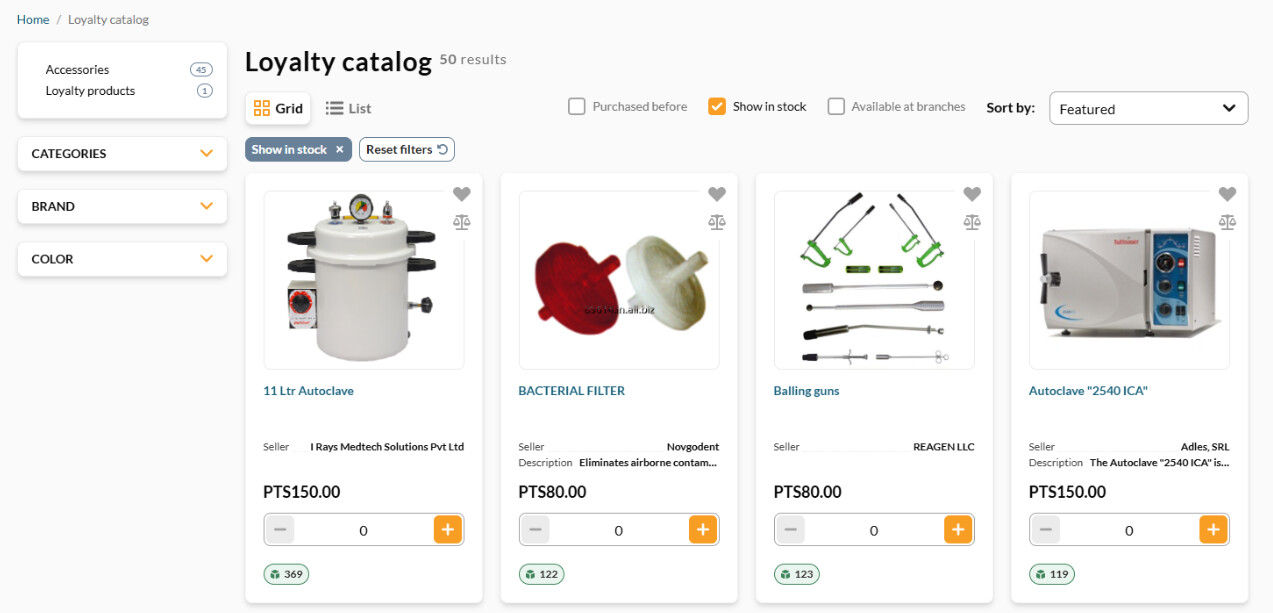
Browsing loyalty catalog. Loyalty 3.1003.0
Customers can now browse a dedicated loyalty catalog on the same store, viewing products available for loyalty points alongside the regular assortment:
Product factors added. Loyalty 3.1002.0
You can now display how many loyalty points a customer earns while browsing the catalog. The earnable amount is calculated per product, with the ability to apply different multiply factors to specific customer groups.
The earnable points are calculated as follows:
Loyalty points = (Product price − Discount) × Multiply factor

In the example above, you get twice as many loyalty points as the amount paid for the first item, and half of the amount paid for the second item.
Configurable products. Catalog 3.1020.0 + xCart 3.1009.0
Conditional visibility for configuration sections has been added to configurable products. Configuration sections can now be shown or hidden based on selections made in other sections, allowing product configuration flows to reflect real-world dependencies. For example, an Installation Services section can appear only after a customer selects Ski Bindings.
Configuring products
Setting up product configurations
-
Text inputs now show a live character counter for text messages:

Default options for configurable products. Catalog 3.1025.0
You can now mark one option per section as the default. When a shopper opens the product page, that option is already selected, the price already includes any surcharge it carries, and dependent sections show their own defaults too:

Granular catalog entity permissions. Catalog 3.1002.4
Catalog access can be configured separately for categories and products within a catalog. A role can be granted full write access to categories while limiting products to read-only, or vice versa. This replaces the umbrella catalog:* permissions that cover both entity types together. Eight permissions are registered under the Catalog group in the role editor:
| Permission | Purpose |
|---|---|
catalog:categories:create |
Create categories |
catalog:categories:read |
View categories |
catalog:categories:update |
Edit categories |
catalog:categories:delete |
Delete categories |
catalog:products:create |
Create products |
catalog:products:read |
View products |
catalog:products:update |
Edit products |
catalog:products:delete |
Delete products |
Managing roles and permissions
Filtering properties.moved to Store settings. Catalog 3.1022.0
Filtering properties moved to Store settings. Per‑store filtering properties (the attribute, range, and price‑range filters that drive faceted browsing) are now stored as a store‑level Setting instead of a Store Dynamic Property. The change is transparent: the Aggregation properties widget, the public aggregation API, and storefront faceted browsing all keep working exactly as before.

Virto Pages index rebuild and export/import. Pages 3.1004.0 + Page Builder 3.1008.0 + Builder.io 3.1001.0 + Sanity 3.1001.0 + Contentful 3.1000.0
The Pages module is now integrated with the platform’s full‑text search infrastructure and supports pluggable CMS content providers:
- Pluggable content providers. Pages can be sourced from Virto Page Builder, Builder.io, Contentful, and Sanity out of the box, each configured via store‑level settings.
- Search index management. Build and rebuild operations are available from the admin UI and as background jobs. If a provider doesn’t support reindexation, the rebuild fails with a clear error instead of producing an incomplete index.
- Export /import. Pages participate in the Platform’s standard backup and restore, and imported pages are automatically re‑indexed.
Content-related modules
Backup and restore
Frontend Application Initialization via xAPI. xAPI 3.1009.0 + Frontend 2.50.0
Developers now get a single, reliable way to learn what a platform instance can do before they query it, and operators get a Frontend that adapts to exactly the modules a given store runs.
The Frontend now bootstraps from a single initializeApplication GraphQL query, resolved by the store’s domain. The query returns a complete capability manifest: store settings, installed modules with their versions, and feature flags. With this map in hand, the Frontend plans every later query and includes or excludes optional features such as white labeling, customer reviews, and quotes.
Until now the Frontend (a Vue.js SPA) started talking to the platform through many independent GraphQL calls, with no unified view of what the backend offered. The single bootstrap query prevents:
- Wasted requests for features that are not installed, for example querying white labeling or product reviews when the module is absent.
- Runtime errors when the Frontend expects a GraphQL type that does not exist.
- Version mismatches, since there was no compatibility contract between the Frontend and backend modules.
- Guesswork, since there was no single entry point describing the platform instance the Frontend is connected to.
A single bootstrap query resolves the store by domain and returns the capability map before any feature queries run:
query InitializeApplication($domain: String!) {
  store(domain: $domain) {
    storeUrl
    settings {
      modules {
        moduleId
        version
        settings { name value }
      }
    }
  }
}
Optional features can be turned off in production. When an operator disables an optional module or switches off its setting, the manifest reflects that, and the Frontend automatically stops requesting that feature with no code change. This keeps production deployments lean and avoids shipping capabilities a store does not use.
When the Frontend runs against an incompatible backend, it surfaces a clear report listing the modules and minimum versions required, so administrators know exactly what to upgrade.

Backup and restore. SQL Queries 3.1002.0
Administrators can now export and import SQL queries through the platform’s Backup and Restore feature, making it easy to migrate queries between environments.

UI kit
A new date-picker component has been added to the UI Kit, featuring improved keyboard input behavior and a new change event for consistent handling of typed, pasted, and picker-selected dates. Editing pre-filled dates is now smoother, and entering 0 no longer clears the field during input:

Marketplace & Virto OZ
This release improves both marketplace portals and advances the Virto OZ AI assistant.
Vendor portal
The vendor experience became cleaner and more reliable:
-
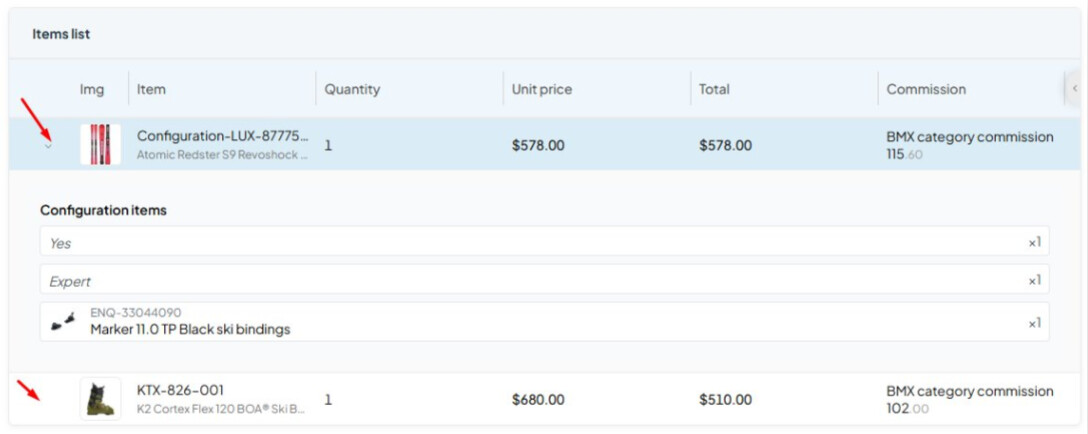
The expand chevron now appears only for order line items that can actually be expanded, for example configurable products with configuration items. This declutters the order items list:
-
A vendor organization validator now runs across all add and edit scenarios: vendor registration, vendor information editing, and operator-side vendor creation and editing:
Duplicate company or vendor names are caught early with a clear message.
-
A new end-to-end test foundation covers Orders, Products, Offers, Team, Fulfillment Centers, and Seller Details, which raises release confidence for the portal.
-
Vendor portal modules were updated to the new Module Federation structure.

Virto OZ
Virto OZ moved closer to the core Platform and gained catalog translation in the admin portal.
-
Catalog translation is now integrated into the platform admin portal. Virto OZ picks the languages active in the catalog and translates localized product names and editorial reviews. Changes require approval before they are written:
-
From the Virto OZ panel, operators can update selected products, change product status, and export products through natural language commands.
-
Work in progress includes tenant and agent management, Page Builder integration, adding Virto OZ to the Virto Commerce backend, and migrating product localization into the main Catalog module.

For more information, request a demo
VC‑Shell
- VC-Shell 2.0.0: first stable release The back-office UI framework reached its first stable release after 35 alpha iterations.
Key highlights:
- The public API is now frozen, so semver guarantees apply and consumers can pin to
^2.0.0with confidence. - A single command,
/vc-app migrate, runs preflight checks and applies codemods for all 2.0 breaking changes. It then reports automated, manual, and uncovered items. - A trunk-based PR flow adds premerge checks: typecheck, tests, lint, locales, circular-dependency, and architecture guards. Each release tag triggers an automated npm publish and GitHub Release.
- A Module Federation fix shares framework subpath exports and removes duplicate runtime bundling. It also adds dashboard render gating and a batch of consumer-visible UI fixes.
- The Developer Guide is now complete, with 180 docs across concepts, composables, components, plugins, and getting-started. The docs are co-located with the code and auto-synced to the documentation site.
Explore the new features and capabilities
QA updates
Quality assurance efforts this cycle focused on improving automation reliability, CI diagnostics, and expanding AI-assisted testing.
-
Test automation and CI:
- Expanded automated testing coverage across multiple database providers, including PostgreSQL, MySQL, and SQL Server.
- Improved CI diagnostics with richer failure data, including Platform, database, and Elasticsearch logs for faster issue investigation.
- Stabilized automated test execution and reduced flaky behavior to improve reliability.
- Improved test performance and consistency through more efficient indexing and selective execution of optional module tests.
-
AI-assisted testing:
- Expanded AI-driven testing to improve regression coverage and reduce manual scripting effort.
- Introduced specialized testing agents to automate large-scale test execution and support self-healing workflows.
- Continued development of an AI-assisted pipeline for generating test cases and acceptance criteria.
-
Visual and functional automation:
- Expanded visual and functional automation coverage in the OPUS suite.
- Added new automated regression scenarios and identified additional issues through automation.
- Continued investment in Playwright-based regression automation for staging environments.