Welcome to the May 2026 release notes from Virto Commerce! As nature bursts into full bloom, so do our products. This release brings refined performance, smarter tooling, and delivers more flexibility and efficiency to support your growing commerce needs.

We’ve been experimenting with new ways to present updates making them not just informative, but genuinely engaging.
Now we’d love your input. Which format do you prefer?
- Comic book–style (fresh, visual, and story-driven)
- Classic screenshots (familiar and detail-focused)
- Both versions (the best of both worlds)
- Your option (leave a comment)
Key updates at a glance:
- New modularity + new Azure App Configuration module extracted
- Dark modes compliant with WCAG 2.2 AA, EAA, ADA, Section 508, and AODA accessibility standards introduced
- OpenSearch and System Operations modules first releases
- Platform settings UI updated
- Page Builder major updates released
New Modularity. Platform 3.1012.0
The platform’s module loading architecture has been rewritten around a single ModuleBootstrapper entry point. All module operations now flow through a fluent, composable pipeline (Discover() → Copy() → Load()) that makes the startup sequence explicit, testable, and reusable for design-time scenarios (for example, vc-build can call Discover() alone without starting the Platform).
ModuleBootstrapperhas been introduced as the single entry point for module operations.- The
IPlatformStartupextension point has been added for module-level bootstrap hooks. ModuleBootstrapperis registered in DI asIModuleService, so controllers, health checks, and services resolve it uniformly.- The new
LocalModuleCatalogAdapterbridges the bootstrapper to DI-dependent code that resolvesILocalModuleCatalogorIModuleCatalog, preserving backward compatibility. - Install, Uninstall, and Downgrade scenarios are fully supported end-to-end.
- Automated refresh of the prohibited folder during module management.
 Loading modules into Application Process

Clean modularity. Platform 3.1012.0 +  Azure App Configuration module first release
Azure App Configuration has been extracted from the Platform core into its own module. Ten Azure-related assemblies that previously shipped with the Platform (Azure.Data.AppConfiguration, Azure.Messaging.EventGrid, Azure.Security.KeyVault.Secrets, Microsoft.Azure.AppConfiguration.AspNetCore, and others) are no longer part of the core distribution. Deployments that do not need them no longer pay their size or security-surface cost.
A new Azure App Configuration module brings centralized, cloud-managed settings back to platforms that want them, with Managed Identity and connection-string authentication, label-based environment filtering, and sentinel-based runtime refresh.

AzureAppConfiguration node in the appsettings.json file
Modernized settings UI menu. Platform 1011.0
Settings experience has been modernized - a single wide blade with left-tree navigation and a right properties panel, replacing the legacy narrow blade stack.
- Unified settings blade with left tree navigation and right properties panel.
- Clean REST API that separates schema from values and returns only modified values.
- Global / Tenant scoping via URL path (
/global/or/tenant/{type}/{id}/). - JSON import/export for saving and loading settings as JSON document files.
- Inline JSON editor with CodeMirror (syntax highlighting, folding, validation).
- Reusable blade: the same controller works for global settings, store settings, payment settings, and custom entities.
- Filter and search: filter popup (modified only, by module) + keyword search across names, values, and groups.
- Dirty tracking: unsaved-changes prompt on navigation; save button disabled until changes are detected.
- Backward compatible: the existing API and UI remain fully functional.
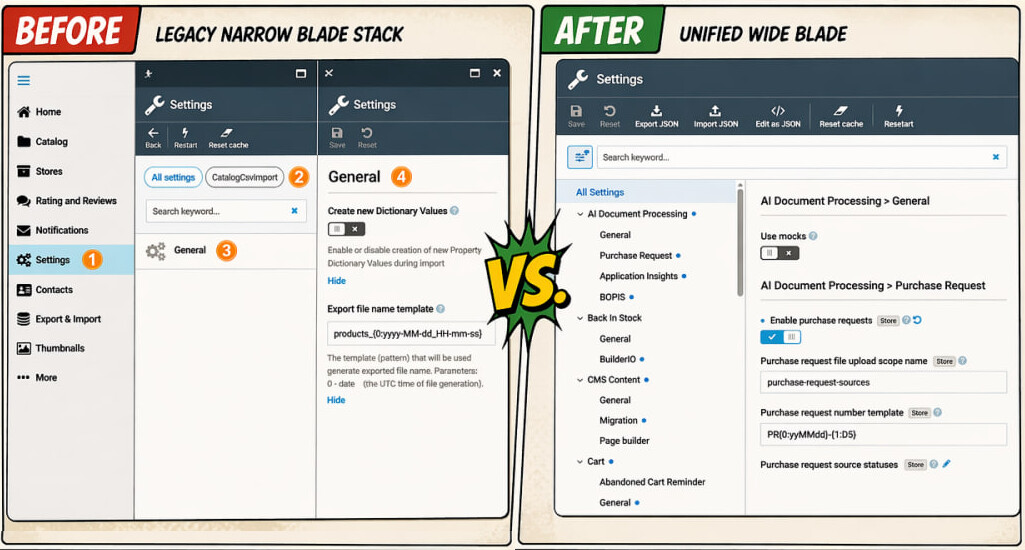
View our interactive demo to explore the new settings experience
Timestamp display in log change entries. Platform 3.1007.7:
The Time ago format is disabled by default. Orders and similar entities use the medium format (MM:DD:YYYY HH:MM:SS). Logs use the extended medium format (MM:DD:YYYY HH:MM:SS.fff).
OpenSearch module first release
A new OpenSearch module joins the Virto Commerce search-provider lineup alongside Elasticsearch (7/8/9), Elastic App Search, Algolia, Azure Cognitive Search, and Lucene. Like the other providers, it plugs into the Search module and stores indexed documents for the platform’s full-text search, faceting, and blue-green indexing.
Supported deployment options:
- OpenSearch (self-hosted or any OpenSearch-compatible cluster).
- Amazon OpenSearch Service (fully managed AWS deployment).

OpenSearch module developer guide
System Operations module first release
A new System Operations module consolidates commonly used maintenance and diagnostic actions into a single, well-documented page. Operations previously scattered across Settings, Platform Info, and widgets now live under one menu, each with a short description of what it does and when to use it.
Grouped into three categories:
- Developer tools: Health, Hangfire, Swagger, GraphQL.
- Maintenance: Platform information, Reset cache, Restart Platform, Install Sample Data, Export Platform Data, Import Platform Data.
- Diagnostics and export: Download Package JSON (vc-package.json for environment replication), Module Load Sequence.

Improved quantity stepper for configurable products. Frontend 2.45.0
The cart-add flow for configurable products has been redesigned. When shopping configurable products, you can now:
- Add one unit of the customized product to cart.
- Update the existing configuration via the Update cart button.
- Add additional configurations to the same cart via the Create new configuration link.
- Edit the quantity of each configured line directly in the cart.

View interactive demo to explore the feature
Max-length validation for configurable products. Frontend 2.46.0 + xCart 3.1007.0
Text-type configuration section has been extended with three new fields:
- Allow custom text.
- Allow text options.
- Max length.
The Frontend and backend xAPI now honor the max-length constraint and display a validation warning when the configured text exceeds the limit.
Adding sections and options to configurable products
Preview as user (impersonation). Page Builder 3.1002.0
Page Builder now supports previewing pages as a specific Frontend user group (agent, reseller, employee, etc). This is essential for stores with disabled anonymous access (closed stores / login required), where product blocks, categories, and other authenticated content would otherwise fail to load in preview mode.
Store administrators configure the list of Frontend users available for preview. After that, you can open Designer and select any configured user from a dropdown next to the device selector to see the page as that user would. Selecting Anonymous returns the preview to the unauthenticated view.

Save, load, and clone page content. Page Builder 3.1003.0
Three new page-level operations complete the content-reuse story:
-
Save content downloads a page’s content (all blocks and settings) as a JSON file named
{page-name}-content.json. Available on Draft, Active, and Archived pages. -
Load content (available on the Draft tab) creates a new page from a previously exported JSON file. After selecting the file, fill in Name, Permalink, and Language. The new page is populated with the imported blocks.
-
Clone creates an exact copy of a page, including all content blocks. The clone opens as a Draft with name
{original} (copy)and permalink{slug}-copy, ready to be renamed.

Export, import, and clone pages.
Back up and restore. Page Builder 3.1004.0
Page Builder now integrates with the platform-wide backup and restore pipeline. Administrators can export and import all Page Builder pages as part of standard platform data management.
- All grouped pages serialize into the backup archive, including metadata (Name, Permalink, StoreId, CultureName, Visibility, UserGroups, OrganizationId, StartDate, EndDate) and every page variant with full JSON content.
- All variant statuses are exported: Draft, Published, and Archived.
- Each page retains its
GroupIdfor reliable matching during restore. - Restore is idempotent. Running the same restore twice produces identical results with no duplicates. Pages deleted after backup are recreated with original IDs; pages modified after backup are reverted to the backup state.

Lightbox payment mode. Datatrans 3.803.0
Datatrans has been extended with a Lightbox payment mode alongside the existing Secure Fields flow. Administrators pick the mode per store via the Datatrans payment-method settings; no appsettings.json changes required.

Payment form localization. Datatrans 3.1001.0
The Datatrans payment window is now fully localized. Language is resolved from ProcessPaymentRequest.CultureName with fallback to Store.DefaultLanguage, and is omitted when the selected language is not supported by Datatrans.

Facets sorting by name and score. Catalog 3.1017.0 + xCatalog 3.1004.0
Catalog managers can now control the display order of filter terms (facets) on storefront product listing pages by setting priorities on dictionary items. This replaces the default alphabetical sorting with business-driven ordering, ensuring more relevant options appear first:

Vimeo video support for catalog. Catalog 3.1016.0
Category managers can now embed Vimeo videos in product pages alongside existing YouTube support. Adding a Vimeo video requires a Vimeo access token preset in the platform configuration file

Dark mode themes. Frontend 2.45.0
Dark mode is now available on the following themes:
- Mercury (default)
- Coffee
- Watermelon
- Black-Gold

The Coffee theme delivers approximately 90% out-of-the-box compliance with WCAG 2.2 AA, EAA, ADA, Section 508, and AODA accessibility standards. No additional configuration or paid add-ons are required.
The key features include:
- Zoom & scaling: Cannot be disabled on core pages; content scales to 200% without layout issues
- Keyboard navigation: All interactive elements (menus, filters, forms, checkout) accessible without a mouse
- ARIA & screen readers: ARIA labels, semantic HTML, compatible with JAWS, NVDA, VoiceOver
- Responsive accessibility: Works across desktop, tablet, and mobile; touch targets meet WCAG 2.2 minimum size
- High-contrast colors: Color combinations meet contrast ratio requirements
Such compliance:
- Reduces legal risk in the EU (EAA in force since June 2025), the US (ADA / Section 508), and Canada (AODA).
- Opens the market to over 80 million people with disabilities in the EU and over 61 million in the US.
- Accessibility patterns are built in. Partners incur no extra development cost.
- All accessibility features are included in the standard license at no additional cost.
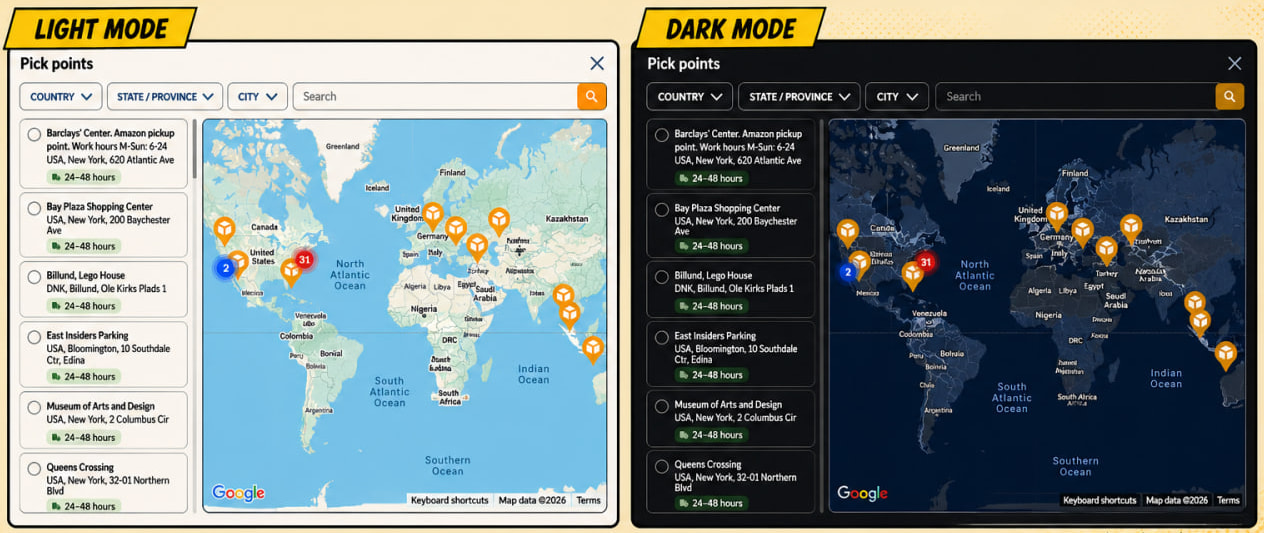
Google maps dark mode. Frontend 2.44.0
A Google Maps dark-mode style is applied consistently when a dark theme is active.
Layout template handling aligned with notification template behavior. Notifications 3.1005.0
Email layout templates now follow the same predefined/override logic as notification templates. A predefined layout is served from code until it is explicitly modified through Platform Manager. If the source layout changes in code and no override exists in the database, the updated version is picked up on restart. Developers can now update layouts in code without database migrations.
Managing notification templates
Marketplace
-
Product and offer details blades reorganized: the detail layout has been restructured to surface the most-used fields first - the image section has been moved to the top of the product details blade, so vendors see product images immediately without scrolling. Images are organized as a carousel to save space and can be expanded into the full gallery when needed:
-
Dark theme: the vendor portal now offers a dark theme alongside the default light theme.
-
Price-tag duplicate-condition validation: when editing price tags, the system now prevents vendors from saving two tags with identical conditions, eliminating the ambiguity that caused unpredictable pricing:
-
Vendors can see product configurations in orders: when an order contains configurable products, the vendor’s order view now displays the customer’s selected configuration.


Operator portal
- Configurable product options review: operators can now review the full configuration options of configurable products from the marketplace-products detail view (sections, option counts, associations, linked vendors).
For more information, request a demo
VC-Shell
-
defineBlade()macro: replacesdefineOptionsfor blade configuration. Config now lives in a dedicatedbladeConfigRegistryinstead of polluting the Vue component instance. A Vite plugin handles the transform at build time with zero runtime cost. Auto-migration via thedefineOptions → defineBladecodemod. -
useBladeForm(): unified form state composable replacing ~50 lines of boilerplate per blade (pristine snapshot, isModified, canSave, beforeUnload guard, error bag). Deep semantic comparison treatsnull,undefined, and[]as equivalent. -
useDynamicProperties()rewritten around a strategy pattern with five pluggable strategies (boolean, dictionary, regular, color, measure) replacing a ~400-line monolithic function. -
useAssetsManager(): modern asset-management composable replacinguseAssets(). Adds batch upload, confirmation dialogs, parallel uploads, and a cleanerAssetLiketype. Consumer migration via codemod. -
VcGallery filmstrip layout with Swiper: horizontal scrollable thumbnails, fullscreen preview with keyboard navigation, mobile tap-to-reveal controls, drag-to-reorder improvements, colored extension badges. Fixed image flicker on expand/collapse.
-
VcDataTable: proportional column resize (neighbors adjust proportionally), auto-scale via ResizeObserver, and
useDataTableSort()composable withsort-field/sort-orderv-model support. -
Custom blade banners via
useBlade().addBanner()— danger/warning/info/success variants, dismissible, with optional custom render functions. -
useNotificationContext(): provide/inject-based replacement for prop-based notification templates. -
useResponsive(): composable replacement for the global$isMobile/$isDesktophelpers. -
Z-index token scale (CRITICAL / OVERLAY / LAYOUT / LOCAL tiers), enforced via three lint layers (Stylelint, ESLint Tailwind, ESLint template). Fixed a long-standing VcSelect-behind-VcSidebar clash.
-
ESLint 9 flat config migration from legacy
.eslintrc. -
Layer violation checker:
core/no longer imports fromshell/orui/, enforced by an automated checker and pre-commit hook. All circular dependencies broken. -
Interface-based API client: nswag output defaults to interface style,
.ts-only simple mode, tree-shakeable. Five nswag-class-to-interface codemod rules included. -
BladeDescriptor replaces
IBladeInstance, addsmaximizedandbreadcrumbsfields, auto-unwraps nested refs indefineBladeContext. -
/vc-appAI Claude Code skill delivering the full app lifecycle:create(scaffold project),generate(list + detail modules),promote(mock-to-real-API), anddesign(AI-driven 6-phase design workflow). Three subagents - module-analyzer, blade-enhancer, promote-agent - and a curated knowledge base of vendor-portal patterns. -
Smart Column Resize for VcDataTable: pixel-based widths replaced with a weight engine (Σ ≈ 1). Dragging a column border shrinks neighbors proportionally; window resize scales columns predictably; show/hide via the column switcher redistributes free space evenly. Two modes: fit (columns fill the table) and gap (preserve filler space). State restored from localStorage survives the initial props re-init. Covered by 344 unit tests.
-
Transparent Blade Skeleton:
VcBladenow exposesBladeLoadingKeywhenloading=true, and every form control (input, select, editor, checkbox) renders its own layout-aware skeleton.VcDataTableandVcGalleryself-skeletonize.VcBannerandVcButtonauto-hide during blade load (no flicker). The genericBladeContentSkeletonhas been retired; blade pages need no changes. -
useDataTablePagination(): removes ~15 lines of pagination boilerplate per list blade (currentPage, pageSize, pages, skip, paginationProps). Returns ready-to-bindpaginationProps,goToPage, andreset. Covered by 13 unit tests, with docs and a Storybook story. -
useBladeForm().markReady(): for prefilled-entity scenarios (for example, “Duplicate product” where data is loaded programmatically but should appear modified). Keeps the original pristine snapshot so the Save button activates immediately, rather than resetting the baseline viasetBaseline(). -
BREAKING - no global component registration: the framework no longer calls
app.component()/app.directive(). All 64Vc*components and 2 directives (v-loading,v-autofocus) must be imported explicitly from@vc-shell/framework/ui. Results: tree-shakeable bundles (unused components drop), IDE-resolvable imports (no more magic globals). Automatic migration via theremove-global-componentscodemod, which scans every SFC, collects used Vc-tags and directives, and inserts de-duplicated imports. 6 fixture tests cover edge cases. -
Migrate CLI v2: modular runner (
runner.tssplit intofile-scanner/sfc-processor/dep-updater), topological sort of transforms, idempotency guard (second run produces zero modifications), and an auto-generatedMIGRATION_REPORT.mdwith Automated / Manual / Not-Covered sections. -
Seven new codemods:
remove-global-components,replace-cover-method(openBlade({replace})→coverWith()),define-expose-to-children,locale-imports,window-globals(diagnostic forwindow.moment/_/Vue),blade-events-cleanup,icon-replace(bare<i>→<VcIcon>). -
/vc-app migrate- AI Migration skill: Claude Code now orchestrates the full framework upgrade in four phases - pre-flight (detect framework version + git status), run CLI (smart resolver: localnode_modules→ env override → npx fallback), AI pass (migration-agentsubagent reviews items codemods can’t cover), and report. Ships with 5 migration prompts (nswag, widgets, form, blade-props, notifications).
Explore the new features and capabilities
QA
The QA team shipped two test-suite releases (2.44.0 and 2.45.0) and completed a major modernization milestone: 260 automated tests were migrated from the legacy Katalon framework to the modern Playwright framework. The test project was also restructured for speed and maintainability.
This contributes to:
- Faster QA cycles, faster releases. GraphQL tests now run 2× faster, and end-to-end tests run 2.5–3× faster. The QA team detects issues sooner, and features ship with higher confidence.
- Better-tested platform. A unified naming scheme for UI test locators and stronger type checks reduce flaky tests and produce more reliable regression coverage.
- Easier to scale. The new layered project structure and simplified test logic (clean arrange / act / assert) make it cheaper to add coverage as Virto Commerce grows.
- Visible progress signals. A colored CI log makes warnings and errors immediately obvious when a build runs.

Virto Commerce
-
Our webpage has received a number of new articles, including a new asset.
-
Our global marketing, business development, and leadership teams met in Istanbul for three days. Workshops, sharp ideas, and just the right amount of Turkish tea to fuel it. All to keep raising the bar for our customers and partners:

Release notes new design
You can find interactive, self-contained HTML version of the Virto Commerce releases here.

It is designed to let product, engineering, and business stakeholders review what shipped, mark features for their own backlog, and export a ready-to-paste task list.
