Welcome to the March 2026 release notes from Virto Commerce! As spring begins to bloom, this sprint brings meaningful improvements and expanded AI capabilities, all designed to help your teams move faster and work smarter.

Key updates:
- Virto Commerce settings configuration via configuration files.
- Case-insensitive search support for PostgreSQL.
- SQL Queries module improvements.
- Virto OZ expanded with Human-in-the-Loop, product property filling, and search capabilities.
Webinar "All Things AI: From “Help!” to “Order Placed”

On March 10, join our webinar to learn how AI can truly solve B2B ecommerce complexity.
While many platforms apply AI to surface-level use cases like basic UX enhancements or simple Q&A, real B2B commerce requires far more sophistication.
In this session, we’ll demonstrate how Virto Commerce applies AI where it matters most:
- Intent-aware search that understands complex, technical queries.
- AI orchestration that automates multi-step B2B workflows.
- Intelligent assistants designed for enterprise-grade commerce scenarios.
We’ll showcase practical, working solutions available today, with live demos and technical insights you can implement in your own architecture.
 March 10
 16:00 CET / 9:00 CT / 7:00 PT
 Oleg Zhuk, Virto Commerce CTO
Andrey Artiomov, Product Owner
Anna Shubina, Director of Product Marketing
Join us for live demos and technical insights you can actually implement
Virto Commerce settings configuration via configuration file. Platform 3.1002.0
Platform administrators and DevOps engineers can now override Virto Commerce platform setting values (including default values) directly via configuration file and environment variables.
Both Force (locks the value, overrides UI) and Default (sets the default, still editable in UI) modes are supported, as well as global and per-tenant (store-level) scopes. Settings applied via configuration are visually indicated in the admin panel so administrators always know the source of truth.
For settings that have a default override defined in configuration, the Admin UI provides a Reset to Default capability. The Reset icon is displayed when the current value of the setting differs from the resolved default value. The Reset icon is not displayed when:
- The setting value equals the default value.
- The setting is overridden by a Force configuration (Global or Tenant/Store).
{
  "VirtoCommerce": {
    "Settings": {
      "Overrides": {
        "Default": {
          "Global": {
            "ProductReviews.Enabled": true,
            "ProductReviews.RequireModeration": true
          }
        }
      }
    }
  }
}

Case-insensitive search support for PostgreSQL. Platform 3.1004.0
By default, PostgreSQL performs case-sensitive string comparisons, unlike SQL Server. This has historically required extra workarounds for modules that need to support case-insensitive Contains and Equals search on user-facing fields.
Platform now includes a native extension method UseCaseInsensitiveCollation() that allows module developers to opt specific entity properties into case-insensitive behavior with a simple configuration in their IEntityTypeConfiguration class.
This makes it straightforward to add case-insensitive search support to any module running on PostgreSQL without resorting to lower-case transformations or custom query overrides.
Dashboard statistics improvements. Order 3.868.0
Based on partner feedback, the Order module’s dashboard statistics widget has been made more configurable. Administrators can now:
-
Enable or disable the dashboard statistics widget entirely via the Orders → General settings.
-
Adjust the date range for statistics (previously fixed at one year) by setting a custom value in months via the new Dashboard statistics range setting.

New custom blocks in Page Builder and Builder.io. Frontend 2.41.0
Virto Commerce supports Page Builder and Builder.io CMSs. While customers may use either one, both provide a unified set of frontend content blocks (custom blocks) to ensure a consistent storefront experience.
In addition to existing blocks, two new custom blocks have been introduced to both Page Builder and Builder.io:
-
Predefined products:
-
Products carousel:


Menu bar update. Frontend 2.42.0
The personal account menu bar has been upgraded with clearly defined sections to better organize available options:

Reset filters button added. Frontend 2.42.0
If a selected combination of filters returns no products, users can now clear all applied filters with a single click and instantly restore the full product list:

SQL query module improvements. 3.804.0
The SQL Queries module has received a significant set of improvements for both developers and back-office users, delivered in partnership with Luminos Labs:
-
Live execution preview: New
previewandpreview/by-idendpoints return column metadata, capped rows, truncation status, and execution time. Queries execute inside a transaction that is always rolled back, making preview completely safe to run in production: -
Improved report generation: Report output now accepts a
SqlQueryReportContext(name, description, user) and produces significantly better HTML and PDF output: styled and properly escaped HTML, PDF landscape layout with margins, and cleaner exported filenames:
-
Back-office UX overhaul: The query editor has been upgraded to CodeMirror with SQL hints, inline parameter editing, an in-blade test results grid, a new dedicated report-view blade for running and exporting reports, and improved empty-state UI:


Configurable error response sanitization for xAPI/GraphQL. xAPI 3.1002.0
System administrators can now configure whether call stacks, internal error details, and debug information are included in HTTP error responses for xAPI and GraphQL endpoints.
In production environments, sensitive stack traces and internal exception details are now stripped from responses by default:

The development environments retain full error details for easier debugging:
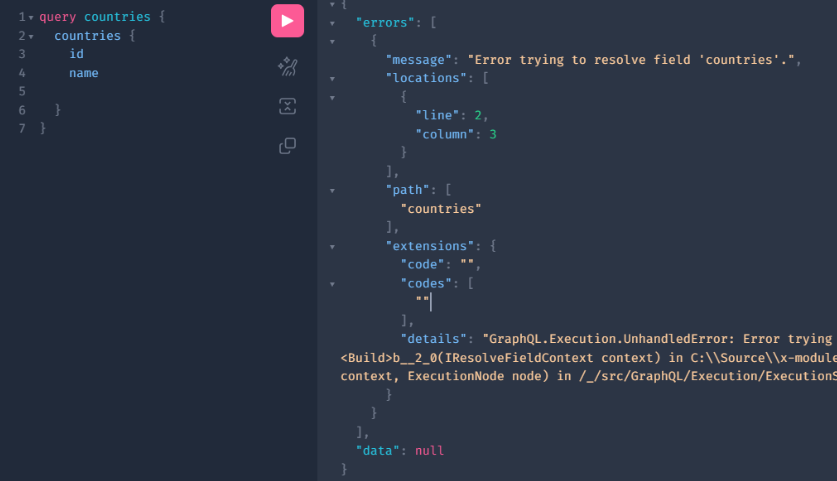
This behavior is configurable per environment, allowing teams to maintain security in production without sacrificing debuggability during development.
GraphType hook and custom schema addition. xAPI 3.1002.0
Module developers can now extend existing xAPI graph types (adding, removing, or modifying fields) before schema initialization, without depending on the extensibility framework.

The new IGraphTypeHook interface makes this clean and decoupled: create a hook class, implement the field modifications using FieldCreator.CreateFieldAsync, and register it with builder.AddGraphTypeHook<YourHook>(). No changes to the core graph type are required.
This is particularly valuable for white-labeling scenarios, partner-specific customizations, and any module that needs to extend the PageContextResponseType or similar shared types.
Notifications feed improvements. Notification 3.1001.0
The Notifications module has been enhanced to reduce database load, enhance responsiveness, and give users greater control over search behavior.
-
The notification feed now defaults to showing the last 24 hours, with additional time ranges available:
-
Search performance has been optimized by excluding email body content from the default keyword search, reducing heavy database queries.
-
A new “Search in Body” filter (disabled by default) allows users to explicitly include email body content when needed.

Storybook updates
We continued enhancing UI accessibility across core components to improve keyboard navigation, screen reader compatibility, semantic markup, and focus management.
-
The following components have been updated:
- VcNavButton: Improved ARIA attributes, focus states, and keyboard interaction.
- VcButton, VcCollapsibleContent, VcDateSelector, VcInput, VcSelect: Enhanced semantic structure, accessible labeling, and consistent focus visibility.
- VcFile: Improved file upload accessibility and assistive technology support.
- VcProductActionsButton: Refined keyboard navigation and ARIA handling.
- VcSlider: Improved screen reader announcements and keyboard operability.
- VcPagination, VcProductImage, VcTable: Enhanced structural semantics and focus order.
- VcProductCard: Improved accessible naming and interactive state handling.
These updates bring the UI Kit components closer to WCAG 2.1 AA compliance and ensure a more inclusive user experience across devices.
-
The VcVariantPicker component has been visually refined for clearer distinction between default, hover, active, and focus states:
-
On mobile devices, pickup location selection has been redesigned for improved usability and alignment with modern mobile map interaction patterns:
-
Visual structure of product cards has been improved within the dropdown:


Marketplace
Virto OZ now supports Human-in-the-Loop workflows. When the AI generates content or proposes changes (for eample, a product description) vendors see a preview with an explicit approval step before any data is saved. Vendors can review, adjust, and then confirm or reject the AI’s suggestions directly in the chat panel, turning Virto OZ into a collaborative co-pilot rather than an autonomous agent.
The AI Assistant in Virto Commerce Marketplace has been significantly enhanced to support broader operational and merchandising scenarios, improving productivity and reducing manual effort:
-
Prompt-based assistance with change confirmation. Users can continue working with predefined suggested prompts or custom prompts tailored to specific tasks. The AI processes requests instantly and returns responses within seconds. Any proposed changes must now be explicitly accepted or declined before being applied.
-
Automated product property generation. The AI Assistant can now automatically generate product properties based on existing product data. This is particularly valuable for large assortments or marketplace environments with frequent catalog updates:
-
Intelligent information retrieval and summarization. The AI can now be used to locate, aggregate, and summarize existing marketplace data:
-
Creating offers: The AI Assistant can generate new marketplace offers:
-
Associating product to similar ones: The AI can automatically suggest related or similar products for cross-selling and upselling opportunities:


For more information, request a demo
VC-Shell
-
The VcDataTable component in VC-Shell has been significantly expanded with new capabilities and major usability improvements:
- Infinite scrolling: Seamless data loading for large datasets without traditional pagination constraints.
- Expandable rows: Ability to reveal additional contextual or hierarchical data within a row.
- Row grouping: Logical grouping of records by column values for improved data organization.
- Cell editing: Inline editing at the cell level for granular data updates.
- Row editing: Full-row edit mode for structured, multi-field updates.
- Multi-column sorting: Advanced sorting across multiple columns simultaneously.
- Column filters: Per-column filtering with improved flexibility and precision.
- Programmatic control: Extended API surface enabling dynamic interaction and state management via code.
-
Core data interaction mechanics have been refined for consistency, performance, and UX quality. including editing, validation, sorting, filtering, row selection, row actions, pagination, drag & drop rows, column setup, mobile view and swipe actions.


Explore the new features and capabilities
Documentation
 We are glad to announce that Virto Commerce documentation is now available through Context7, an MCP server designed for AI assistants. Context7 automatically loads the latest, version-specific documentation and real code examples directly from Virto Commerce source repositories into the AI’s working context. This helps AI coding assistants base their answers on actual, current documentation. By adding “use context7” to a prompt, the tool queries official documentation, parses relevant code snippets, and injects them into the prompt, reducing hallucinated, non-existent code.