 Welcome to the November 2025 release notes from Virto Commerce!
This month, we’re excited to deliver updates that make the platform smarter, faster, and more accessible.
Key updates:
- Technical webinar on composable ecommerce with top specialists
- Multilingual URLs in the Frontend Application
- AI-generated product descriptions and properties in Marketplace
- Documentation versioning support

 Webinar: Composable Commerce and Clean Data
Join our 60-minute session with experts from Virto Commerce, Innovadis, and Luminos Labs, diving into how clean data and strong architecture make composable commerce truly scalable in the enterprise context. Join the session on Thursday, November 13 at 17:30 CET / 10:30 CT.
A can’t-miss lineup:
 Alexander Siniouguine
Stefan Vissia
Jacobi Zakrzewski
 Moderated by Oleg Zhuk
Accessibility enhancements. Frontend 2.34.0
Accessibility enhancements have been introduced as part of ongoing compliance with ADA/WCAG standards:

New background. Platform 3.912.0
The Platform login page now comes with a new background:

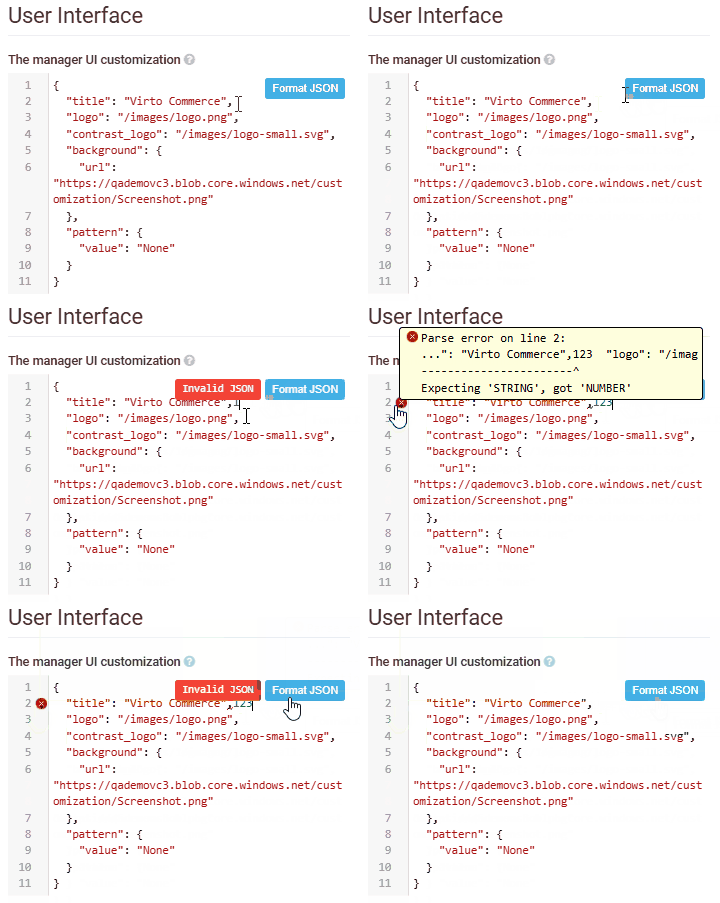
JSON Platform editor with beautifier. Platform 3.912.0
The User interface settings now store a JSON file with manager UI personalization data. The file can be automatically formatted, and detailed error messages appear if issues are detected:
Optimized cart quantity update. Frontend 2.33.0 + Cart 3.837.0 + xCart 3.945.0
Customers can now update product quantities instantly, ensuring a faster and smoother shopping experience:
-
Quantity changes (via +/– buttons or typing) are reflected instantly in the mini-cart:

-
All changes are batched into a single updateCartQuantity mutation, sent after a short debounce delay.
-
If multiple updates occur in quick succession, requests are queued to prevent conflicts.
-
The update operation uses minimal data for faster processing without triggering full recalculations:
Feature Before After Duration of cart operations (avg) * 461 ms 156 ms Count of DB + ES operations 66 16 Mutation for Add, Cart, Remove Multiple One Bulk operations No Yes Cart response Full Response Light
Multilingual URLs. Frontend 2.33.0
The multilingual URLs support allows each localized page in the Virto Commerce Frontend to have a language-specific URL that improves both search engine optimization and user experience.
When a customer visits a multilingual Frontend, URLs automatically adapt to the selected language or region:
| Configuration type | Example URL | Description |
|---|---|---|
| Default language | /about-us |
Used for the default Frontend language when no language code is specified. |
| Language-specific | /{xx}/about-us |
Includes a two-letter language code, e.g., /en/about-us. |
| Region-specific | /{xx-XX}/about-us |
Includes both language and region codes, e.g., /en-US/about-us, /en-GB/about-us. |
The feature is available only for multi-language Frontend configurations. When a customer changes the language in the Frontend, the permalink is updated in the browser to include the selected culture code (for example, /en/about-us → /de/über-uns). The selected language is saved in local storage and automatically applied as the default language for future visits.
Saved for later enhancements. Frontend 2.34.0
Saved-for-later products can now be managed directly from the user’s account — a new Saved for later menu item has been added. From this page, users can add products to an existing cart or create a new cart to start an independent checkout process:

The Saved for later widget displays up to 6 items. Additional items can be shown by clicking the Show more button:

Improved handling for missing price lists on product pages. Frontend 2.33.0
When a user changes the currency on a product details page and a price list for the selected currency doesn’t exist, they will see a notification The product cannot be purchased in the selected currency. Users will continue to see product details and availability as before, but the Add to cart button will be disabled:

Improved No results search experience Frontend 2.33.0
When a user’s search returns no results, a notification is now displayed, and a Reset search button has been added to allow users to quickly return to the full list:

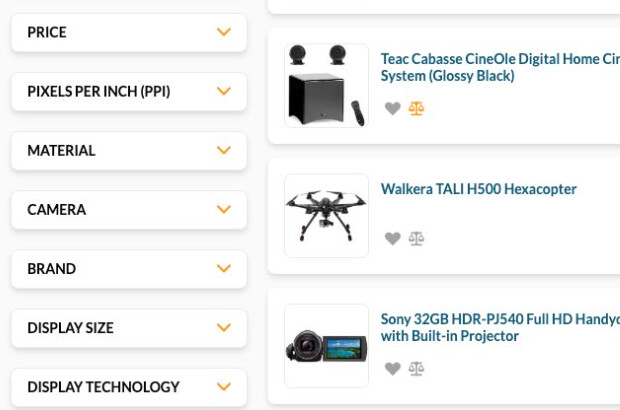
Facet selection count. Frontend 2.34.0
A new feature has been added to improve filtering clarity. Each facet now displays the number of selected items, allowing users to easily see which filters are applied:

Localized sorting by name. Catalog 3.902.0 + xCatalog 3.941.0
Sorting by product or category name in GraphQL queries has been improved. When a cultureName is specified, results are now sorted by the localized name instead of the default (invariant) name:
query {
  products(
    cultureName: "en-US",
    sort: "name:asc"
  ) {
    results {
      code
      name
    }
  }
}
Datarans module upgrade. Datatrans 3.800.0
The Datatrans payment module has been upgraded to the latest Virto Commerce version, ensuring improved compatibility, stability, and performance:

Debugging SEO links. SEO module. 3.809.0
The SEO module allows you to analyze and debug permalink resolutions. The Debug SEO links widget helps you understand how SEO slugs are processed across different stores and languages, making it easier to identify and resolve configuration or routing issues:

Share button renamed. Notification 3.825.0
The Share button in the Notification module has been renamed to Send test message to better reflect its purpose. This change clarifies that the action sends a test email for verification, rather than sharing a template or notification:

Keyboard navigation improved. Frontend 2.34.0
Keyboard navigation has been improved for a more intuitive and accessible browsing experience. Users can now navigate through elements in a more natural sequence:
-
In product details page:
-
In the image gallery:
-
In the filter popup sidebar:


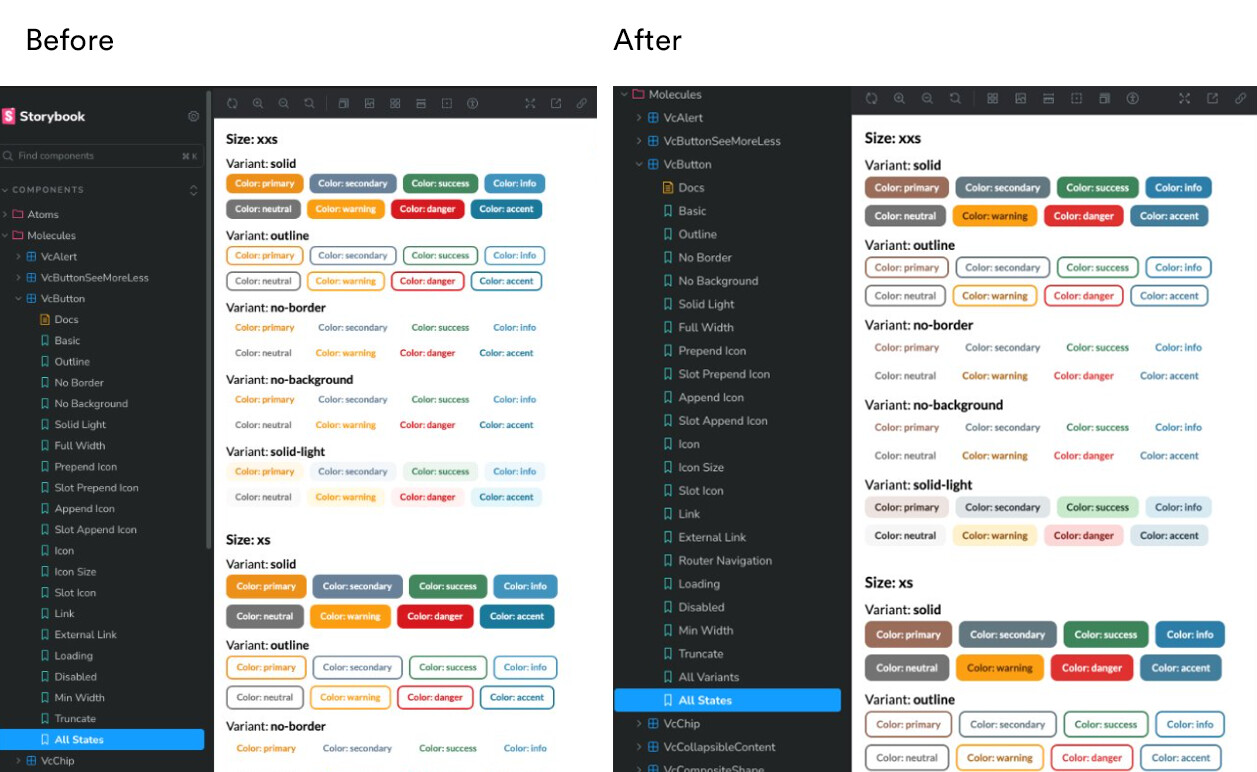
Storybook accessibility and UI improvements
-
Accessibility (a11y) addon settings have been configured for Storybook. The Coffee color preset has been applied in the UI Kit:
-
Accessibility of the
VcButtoncomponent has been improved, with all color options and variants reviewed for better contrast and usability: -
The
VcWidgetcomponent styles have been updated:
-
Storybook stories of 25 UI Kit components from the UI-kit have been converted from the
StoryFnformat to theStoryObjformat. -
Accessibility of the
VcAlert,VcChip, andVcBadgecomponents has been improved.

Marketplace
-
New AI capabilities have been introduced:
-
Text generation and translation support. The AI helper now supports two AI providers - Groc and OpenAI to generate product descriptions automatically based on the product’s name and category.
Descriptions can be reviewed and edited before submission. Vendors can translate the generated content directly within the workflow:

-
Product properties can now be automatically generated using AI based on the product’s name and images:

-
-
Automatic color code assignment has been applied. Product colors are now automatically assigned based on their entered English name using standard HTML color names.
Users can still manually adjust the color code if needed:

-
The system now supports entering multiple color values in a multi-value color property, allowing users to assign several colors to a single product or item.

For more information, request a demo
VC-Shell
-
The VC-Editor has been enhanced with custom toolbar buttons and a font-size selector.
-
A font selection button has been added to the toolbar:
-
Custom toolbar buttons and Tiptap plugins have been enabled.
-
Storybook now includes usage examples for the new toolbar features.
-
-
Dashboard widget placement logic has been improved to provide a cleaner and more predictable layout.
-
A new
useBladecomposable has been introduced to simplify integration with Blade instances.- The Blade provides instance without using
inject(BladeInstance). - Working with Blades in components has become easier.
- The Blade provides instance without using
-
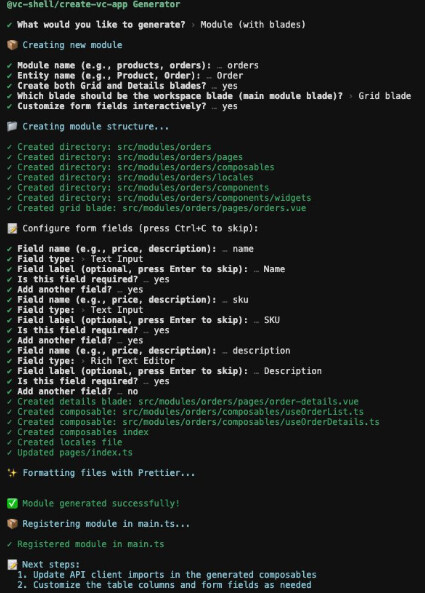
A new generator has been added to simplify development of modules, blades, and widgets. It:
- Generates modules and blades with the correct structure, locales, and VC-Shell hooks.
- Creates forms with controls directly from the CLI.
- Automatically connects modules to the app and widgets to their respective blades.
- Streamlines development for both developers and AI-assisted workflows.


Explore the new features and capabilities
Documentation
The documentation now supports versioning, allowing users to select a specific version from a dropdown. Future updates are planned to release new documentation versions with each stable Platform release.
